
Backfilling
Backfills recover missing or delayed NBA source data and refresh downstream dbt models, ML outputs, and services when needed.
Data Sources
Section titled “Data Sources”There are 3 separate entities that involve varying degrees of backfilling
Ingestion Script
Section titled “Ingestion Script”The Boxscore + Play-by-Play (PBP) data is sometimes not refreshed in time when the Ingestion Script is triggered at 12 pm UTC every day. When this happens, the script will complete successfully and send an alert to Slack that the data was not available
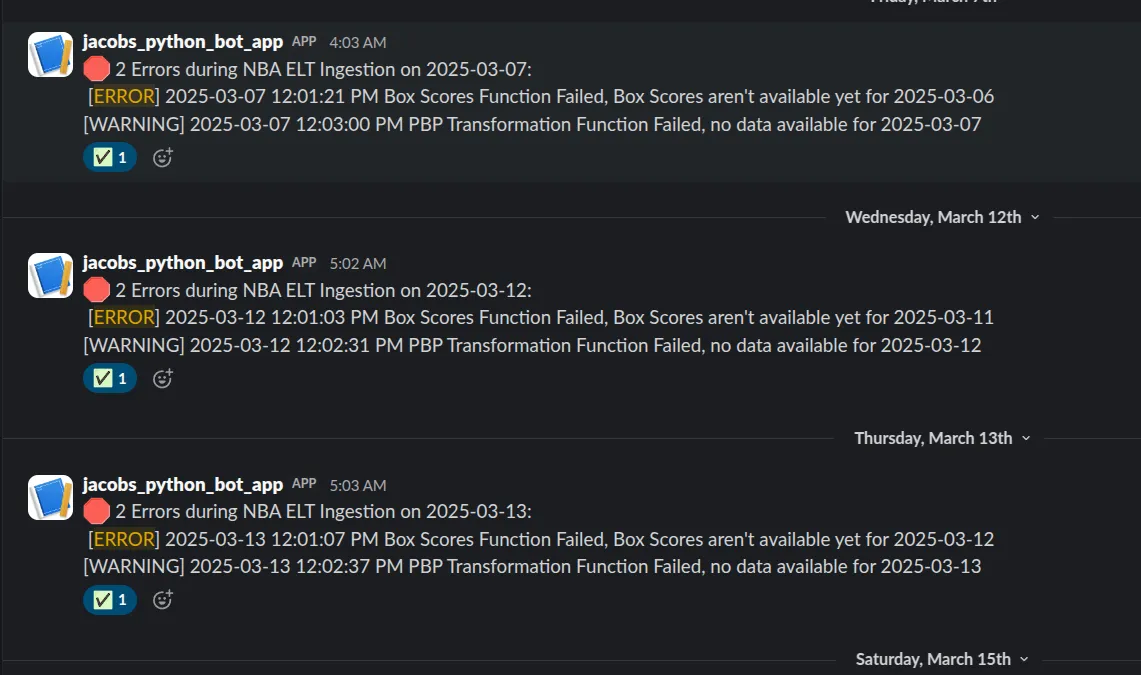
Later in the day, a backfill for the missing data can be run by executing the following command:
python -m scripts.backfill --run_date 2025-01-01- This is a Backfill Script which takes in a required
run_dateargument in the format ofYYYY-MM-DD. It executes the Boxscores + PBP data portion of the Ingestion Script for that run date, and stores the results to Postgres. - For example, if you choose a run date of
2025-01-01, it will pull Boxscore data from games played on2025-01-01, and also pull PBP data for those same games.
After ingesting the data into the bronze schema, you may want to manually trigger a dbt refresh to ensure downstream services are immediately serving the latest data.
Note: This step is optional—if you choose not to refresh dbt manually, the data will be automatically updated during the next scheduled run of the dbt job.
For backfill purposes, to refresh specific models and their downstream dependencies in the dbt project you can run commands like:
dbt build --select fact_boxscores+ fact_pbp_data+ --target prod- This is typically what must be run after an Ingestion Script backfill
dbt build --select fact_schedule_data+ --target prod --full-refresh- Adjust this depending on what you want to refresh
If needed, the entire dbt project can be refreshed with:
dbt build --target prod --full-refresh- As of March 2025, a full refresh on the entire project takes about ~4 minutes to run
Note: Running a full refresh has no downsides. All models can be rebuilt at any time, ensuring consistent accuracy.
ML Pipeline
Section titled “ML Pipeline”The ML Pipeline pulls data from silver.ml_game_features to generate predictions for upcoming games that night. If there was an issue upstream in the NBA ELT Pipeline that affects this table being refreshed properly, then the ML Pipeline will likely fail and not generate predictions for that day.
After addressing the upstream issue and refreshing this table via dbt, you can run the ML Pipeline with the following command:
python -m src.appruns the Pipeline as a module and will pull the data, generate the predictions, and upload them back to Postgres to thegold.ml_game_predictionstable
Afterwards, you can verify the data by running the following query:
select *from gold.ml_game_predictionsorder by game_date desclimit 100;Rebooting Downstream Services
Section titled “Rebooting Downstream Services”The REST API is a stateless service and does not need to be rebooted; it will always pull the latest data available in the mart Layer on every request.
However, if you’ve refreshed the data in the mart Layer and want those changes to be reflected in the Dashboard, then run the following script to reboot the ECS Service which will force it to re-pull the data.
- This typically results in a 5-10 second downtime for the dashboard, but it will automatically re-sync and be back up shortly after
#!/bin/bash
ECS_CLUSTER="jacobs-ecs-ec2-cluster"ECS_SERVICE="nba_elt_dashboard"REGION="us-east-1"
# List taskstask_list=$(aws ecs list-tasks --cluster $ECS_CLUSTER --service-name $ECS_SERVICE --region $REGION)
# Get first taskfirst_task=$(echo "$task_list" | jq -r '.taskArns[0]')
# Stop the first taskaws ecs stop-task --cluster $ECS_CLUSTER --task $first_task --region $REGION